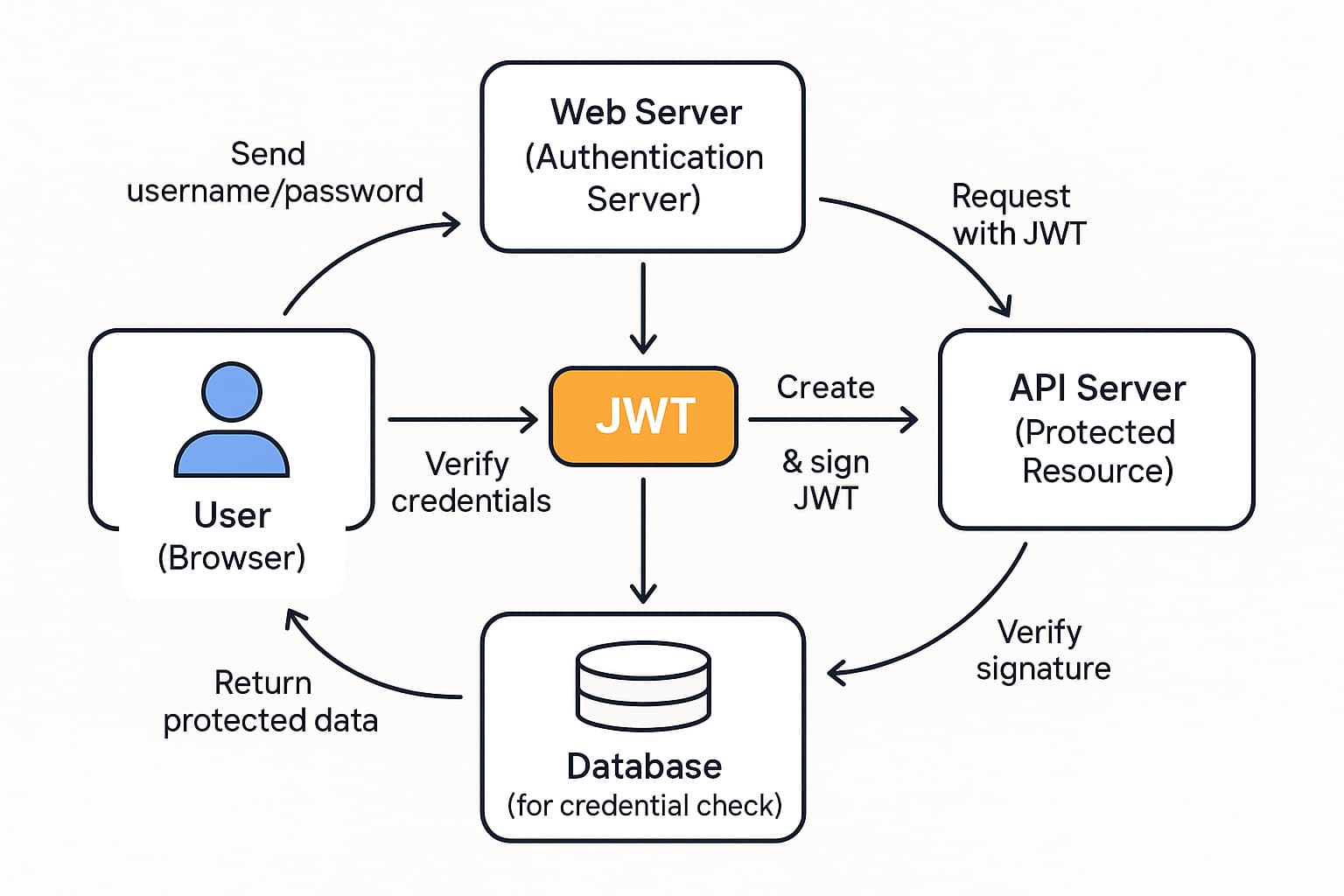
JWT stands for JSON Web Token.
It’s a compact, URL-safe way to represent claims (data) between two parties, often used for authentication in web and mobile apps.
In simple terms
When you log in to a site:
-
- You send your username/password.
-
- The server checks them and, if valid, creates a JWT containing info like your user ID and roles.
-
- The server signs the JWT with a secret or private key.
-
- The JWT is sent back to you and stored (often in localStorage, sessionStorage, or a cookie).
-
- On each later request, you send the JWT, and the server verifies the signature to trust the data inside.
No need to look it up in a database every time if the token itself contains the necessary info (depending on design).
Structure of a JWT
A JWT looks like this:
codexxxxx.yyyyy.zzzzz
It has 3 parts (each is Base64URL-encoded JSON):
-
Header – usually includes:
code{ "alg": "HS256", "typ": "JWT" } -
Payload – the claims (data), e.g.:
code{ "sub": "1234567890", "name": "Alice", "admin": true, "exp": 1731547200 } -
Signature – created by signing
header.payloadwith a secret or private key:codeHMACSHA256( base64Url(header) + "." + base64Url(payload), secret )
The final token is base64Url(header).base64Url(payload).base64Url(signature).
Common uses
-
Authentication – “Who are you?” (user identity).
-
Authorization – “What can you do?” (roles/permissions).
-
Stateless APIs – server doesn’t need to keep session data in memory.
Here’s a side-by-side comparison in plain terms.
1. Basic Auth vs JWT
Basic Auth
-
Very simple HTTP auth method.
-
Client sends
username:passwordon every request. -
Sent in the
Authorizationheader as:codeAuthorization: Basic base64(username:password) -
Base64 is not encryption; it’s just encoding.
JWT (JSON Web Token)
-
A signed token that carries data (claims) like
userId,role, etc. -
Sent in the
Authorizationheader as:codeAuthorization: Bearer eyJhbGciOiJIUzI1NiIsInR5cCI6IkpXVCJ9... -
The token is signed, so the server can detect tampering.
2. Where the “state” lives
Basic Auth
-
Server usually needs to check credentials against a DB on each request, or use a session stored server-side.
-
The “session” is not built into Basic Auth itself.
JWT
-
JWT is stateless: the token itself contains the user info + expiry.
-
Server usually just verifies the signature + expiry, no DB lookup required (depending on design).
3. Security characteristics
Basic Auth
-
Credentials go over the wire every request → must use HTTPS.
-
If the header is stolen, attacker has your username/password.
-
No built-in expiration; valid until you change password or server rejects it.
JWT
-
Token typically has expiration (
expclaim). -
If stolen, it’s a bearer token: whoever has it can act as you until it expires.
-
Must also use HTTPS.
-
Tokens are signed, so they can’t be modified without detection, but they can be read (unless you use encrypted JWTs, which is less common).
4. Ease of use
Basic Auth
-
Super easy to implement.
-
Great for quick tests, internal tools, or simple services.
-
Not ideal for modern web apps with complex auth, roles, etc.
JWT
-
More complex to set up: key management, expiry, refresh tokens.
-
Better suited for:
-
SPAs (React/Vue/Angular)
-
Mobile apps
-
Microservice architectures
-
APIs shared across multiple clients
-
5. Revocation / logging out
Basic Auth
-
“Logout” usually means:
-
Remove stored credentials in the client, or
-
Change password / invalidate session on server.
-
JWT
-
Harder to revoke, because tokens are stateless and self-contained.
-
Common patterns:
-
Short access-token lifetime + refresh tokens.
-
Server-side denylist / revocation list (extra complexity).
-
6. When to use which?
Use Basic Auth when:
-
It’s a small internal service or quick prototype.
-
Only a few clients, all trusted.
-
You’re okay with very simple username/password auth over HTTPS.
Use JWT when:
-
You need stateless, scalable auth (e.g., many servers / microservices).
-
You want to embed roles/claims inside the token.
-
You have SPAs or mobile apps that talk to your API.
-
You need more modern flows (access token + refresh token).\
How should I actually use JWT in a real app?
1. Decide what JWT is for
First, be clear about the role of JWT in your system:
-
Access token: short-lived token proving “this user is authenticated and has these permissions”.
-
(Optional) Refresh token: longer-lived token used only to get new access tokens.
Don’t use JWT as:
-
A database replacement (don’t stuff tons of data into it).
-
A permanent session that never expires.
2. Use short-lived access tokens + refresh tokens
Pattern:
-
Access token (JWT)
-
Lifetime: ~5–15 minutes (typical).
-
Used on every API call in
Authorization: Bearer <token>.
-
-
Refresh token
-
Lifetime: days or weeks.
-
Stored more securely (e.g., HttpOnly cookie).
-
Only sent to a dedicated
/auth/refreshendpoint.
-
Flow:
-
User logs in with username/password.
-
Server verifies and issues:
-
Access token (JWT)
-
Refresh token (JWT or opaque string)
-
-
Client calls APIs with access token.
-
When access token expires, client uses refresh token to get a new one.
-
On logout, invalidate refresh token server-side.
3. Store tokens carefully
Best practice (web apps):
-
Access token
-
Ideal: keep it in memory (JS variable, React state).
-
Avoid localStorage if you can (XSS risk).
-
-
Refresh token
-
Store in HttpOnly, Secure cookie (so JS can’t access it).
-
Use
SameSite=strictorlaxto reduce CSRF risk.
-
Mobile / native apps:
- Use OS-specific secure storage (Keychain on iOS, Keystore on Android, etc.).
4. Design JWT claims minimal & clear
Put only what you actually need on each request:
-
sub– user id (e.g.,"12345"). -
exp– expiration time (required!). -
iat– issued at. -
iss– issuer (your auth service). -
aud– audience (which API it’s for). -
scopeorroles– permissions. -
jti– unique token id (helps with revocation/blacklists).
Avoid:
-
Passwords.
-
Sensitive personal data (full address, etc.).
-
Anything that changes often (or you’ll re-issue tokens constantly).
Remember: JWT is signed, not encrypted – anyone who has it can read the payload.
5. Choose safe signing strategy
-
Use strong algorithms:
-
Symmetric:
HS256(simpler, one shared secret). -
Asymmetric:
RS256/ES256(better for microservices – one issuer, many verifiers).
-
-
Keep secrets/keys out of source code (env vars, secret manager).
-
Implement key rotation:
-
Use
kidin header to indicate which key signed it. -
Keep an active + previous key so you can rotate without instantly breaking tokens.
-
On verification:
-
Always check:
-
Signature
-
exp(not expired) -
nbf(if used) -
issandaud(expected issuer and audience)
-
6. Plan for logout & token revocation
JWT is stateless, so revoking is the tricky part.
Common strategy:
-
Store refresh tokens (or their hashes) in DB / cache:
-
On login: insert refresh token.
-
On logout: delete that refresh token.
-
-
For access tokens:
-
Let them expire naturally (they’re short-lived).
-
Only in high-security scenarios keep a "denylist" keyed by
jtifor known-compromised tokens.
-
If a user is compromised:
-
Revoke (delete) their refresh tokens.
-
Optionally bump a
token_versionorlast_logout_atin DB and include it in JWT; reject tokens with older values.
7. Implement a clean refresh flow
On the client:
-
Call API with access token.
-
If server returns 401 Unauthorized due to expired token:
-
Call
/auth/refreshwith refresh token (cookie or header). -
If refresh succeeds → store new access token and retry original request.
-
If refresh fails → log user out and send them to login.
-
Keep your refresh endpoint:
-
POST only.
-
CSRF-protected (if using cookies).
-
Rate-limited.
8. Don’t overuse JWT
JWT is great, but:
-
If you have a simple server-rendered monolith with only browser clients:
- Server-side sessions + regular cookies are often simpler and safer.
-
Use JWT mainly when:
-
You have multiple services that need to verify auth.
-
You have SPAs / mobile apps talking to a shared API.
-
You want stateless scaling for your API layer.
-
Frequent Question About JWT
1. What is a JWT?
A JWT (JSON Web Token) is a compact, URL-safe token that represents claims (data) between two parties, often used for authentication and authorization.
2. What are the parts of a JWT?
A JWT has 3 parts, separated by dots:
-
Header – algorithm and token type
-
Payload – the claims (data)
-
Signature – used to verify the token wasn’t tampered with
Example:
xxxxx.yyyyy.zzzzz
3. Is a JWT encrypted?
By default, no.
A normal JWT is only signed, not encrypted. Anyone who has it can read the payload; the signature only ensures it hasn’t been modified.
4. How is a JWT usually sent to the server?
Most commonly in the HTTP header:
codeAuthorization: Bearer <your_jwt_here>
It can also be in cookies or query params, but header + HTTPS is the usual pattern.
5. What are typical claims in a JWT?
Common standard claims:
-
sub– subject (user ID) -
exp– expiration time -
iat– issued at -
iss– issuer (who created the token) -
aud– audience (who the token is for)
Plus custom claims like role, email, scope, etc.
6. How does the server verify a JWT?
The server:
-
Decodes header & payload.
-
Computes a signature using the same secret/private key.
-
Compares it with the token’s signature.
-
Checks claims like
exp,iss, andaud.
If anything doesn’t match, the token is rejected.
7. What algorithm should I use for signing?
Common safe choices:
-
Symmetric: HS256 (one secret shared by issuer and verifier)
-
Asymmetric: RS256 / ES256 (private key to sign, public key to verify)
Avoid none or allowing algorithm switching from the client.
8. Where should I store JWTs in a web app?
Typical approach:
-
Access token – in memory (JS variable/state) if possible.
-
Refresh token – in an HttpOnly, Secure cookie.
Avoid localStorage for long-term sensitive tokens if you can (XSS risk).
9. Can I invalidate (revoke) a JWT before it expires?
Not directly, because JWTs are stateless. Common strategies:
-
Use short-lived access tokens.
-
Store refresh tokens in a DB and delete them on logout.
-
Optionally keep a denylist of token IDs (
jti) for high-security cases.
10. What happens when a JWT expires?
If exp is in the past, verification fails and the server usually returns 401 Unauthorized.
Clients then typically use a refresh token to get a new access token.
11. What’s the difference between access token and refresh token?
-
Access token (JWT)
-
Short-lived (minutes)
-
Used on every API call
-
-
Refresh token
-
Longer-lived (days/weeks)
-
Used only to obtain new access tokens
-
Stored more securely and sent less often
-
12. Is Base64 in JWT secure?
No. Base64 (or Base64URL) is just encoding, not encryption.
It’s easily reversible and meant only for safe transport in URLs and headers.
13. Can I store passwords or super-sensitive data in a JWT?
You should not.
JWT payloads are readable by anyone who gets the token. Avoid storing:
-
passwords
-
credit card numbers
-
very sensitive PII
Keep it minimal and non-critical.
14. Do I still need HTTPS if I use JWT?
Yes, absolutely.
JWTs are bearer tokens: anyone who steals one can act as that user until it expires. Always use HTTPS to protect them in transit.
15. How big can a JWT be?
There’s no hard standard limit, but it must fit comfortably in:
-
HTTP headers
-
Cookies
-
Network MTU
Practically: keep them small—only store what you truly need per request.
16. Is JWT better than sessions?
It depends:
-
JWT is great for:
-
APIs, SPAs, mobile apps
-
microservices
-
stateless scaling
-
-
Server sessions (session ID + DB) are great for:
-
simple web apps
-
traditional server-rendered sites
-
easier revocation / logout
-
“Better” depends on your architecture and needs.
17. Can I share a JWT across multiple services?
Yes, that’s a common use case.
With a shared secret or public key, multiple services can verify the same token and trust its claims, which is why JWT is popular in microservice architectures.
18. What are common JWT security mistakes?
Some classic ones:
-
Using
alg: noneor accepting it. -
Hardcoding secrets in frontend code or public repos.
-
Never expiring tokens (
expfar in the future). -
Storing tokens unsafely (e.g., localStorage + no XSS protection).
-
Not validating
issandaud.
19. How do I log out a user with JWT?
Common pattern:
-
Delete/clear refresh token (DB & cookie).
-
Let short-lived access token expire naturally.
-
Optionally bump user’s
token_versionor use a denylist for highly sensitive systems.
20. Can JWT be used without a backend?
You can create and verify JWTs entirely on the client side for some niche cases, but for authentication/authorization you generally need a trusted backend to:
-
validate credentials
-
issue tokens
-
manage refresh & revocation